
Album design software · Windows & Mac
Your photographs.
A finished album.
In seconds.
Automatic layouts. Full creative control.
Your first 3 albums are free: complete, no time limit.
3 albums free · No time limit · No card · No watermark · Windows & Mac
Automatic album generation
Beautiful layouts in seconds.
Layer-based editing
Total creative control.
Pay your way
Per album, monthly, or once for life.
From your selection
to your story.
Drop in your selected photos. Generate your layouts. Make them yours.

01 / Import
Add your selected photos from your wedding day.

02 / Generate
Beautiful, balanced layouts created automatically.

03 / Refine
Adjust, rearrange, add text and make every page your own.
Free to start
Your first 3 albums.
Complete. Free.
Not a time-limited trial and not a watermarked preview: 3 real albums, designed, exported and sent to your clients, with everything LAYON has. Take a week or a year; the free albums never expire. Choose a plan only for the next one.
Try LAYON free- ✓3 complete albums
Any size, up to 30 collages each, plus the cover. - ✓Every feature
Automatic layouts, the full editor, ART designs. - ✓Every export, every format
JPEG, PNG, TIFF and PDF, print-ready, no watermark. - ✓Client approval
Send your client a private review link. - ✓No card, no time limit
Only your email, for the sign-in code. - ✓Windows & Mac
On 2 computers at the same time.
Features
Everything the album
needs, in one window.
Layer-based editing
Build pages with independent photos, text, shapes and frames.
Masks & overlays
Create expressive layouts without leaving LAYON.
Text tools
Names, dates, captions with full typography controls.
Bleed & safe zones
Print-aware guides so nothing gets clipped at the lab.
Fast workflow
From photos to final export with fewer steps and less friction.
Print-ready export
High-res PDF ready for any album lab.
Demo
See LAYON at work.
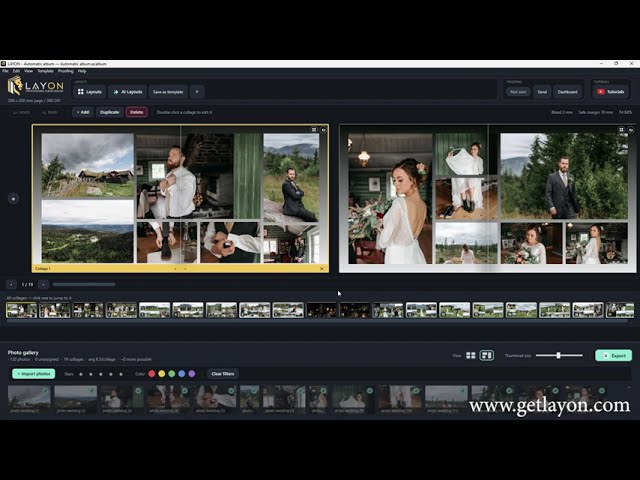
Tutorials
Learn LAYON in an evening.

01 / Welcome to LAYON
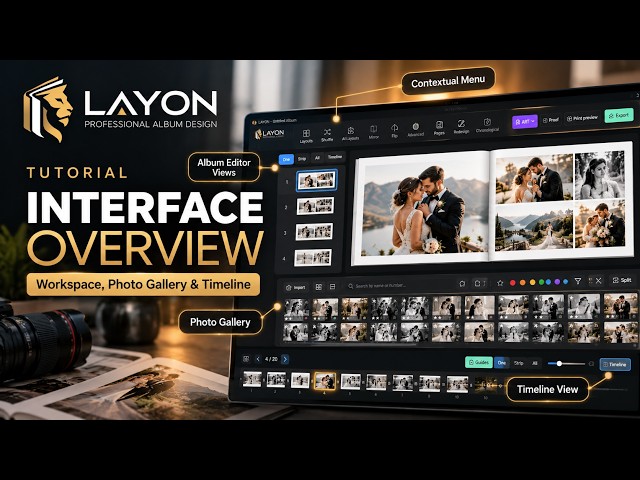
02 / The interface: workspace, photo gallery and timeline

03 / The quick album editor: layouts, AI tools, redesign

04 / A full album with AI, in seconds
Client approval
Approved online,
before it goes to print.
When the album is ready, send your client a private review link straight from LAYON. They approve each spread or leave a comment. You get the feedback by email, refine, and print.
-
01 / Send
One click in LAYON sends your client a secure link. No account, no attachments.
-
02 / Review
The client approves or requests changes per spread, with notes, on any device.
-
03 / Revise
Upload a new version to the same link. The client sees the update instantly.
-
04 / Print
Once approved, mark the album ready and export. The review files are cleaned up automatically.
Design for free.
Pay when an album goes out.
Your first 3 albums are free. After that, design and save as many albums as you like: a plan is needed only to export an album or send it to your client.
Free to start
0 €
Your first 3 albums, complete: every feature, every export, client approval. No watermark, no card, no time limit.
Download freeMonthly
9.99 € + VAT / month
Every album, every export and client approval while you subscribe. Cancel any time.
Pay per album
15 € + VAT
3 album credits. One credit lets one album out — every export, every format, every client proof of it. Credits never expire.
For life
199 € + VAT
All of LAYON 2, paid once: every album, every export and every 2.x update, for life.
- ✓Windows & Mac, on 2 computers at the same time
- ✓Client approval built in
- ✓No watermark, commercial use included
- ✓LAYON 1.x customers: LAYON 2 is included
Prices exclude VAT, which is calculated at checkout for your country. Secure payment via Paddle, our Merchant of Record (card or PayPal). The monthly plan renews every month until you cancel it. By purchasing, you agree to our Terms & Conditions, Privacy Policy and Refund and Cancellation Policy, and to immediate access to what you buy, waiving the 14-day withdrawal right once it begins.
Download
Try it on your own photos.
Your first 3 albums are free. LAYON asks for your email once, to send you a sign-in code.
- ✓Every export, every format
- ✓Client approval included
- ✓No watermark
- ✓No card, no time limit

Safe to install. With the installer from this site, Windows may show “Unknown publisher” (not from the Microsoft Store), and macOS asks you once to confirm. Nothing harmful was found: here are the steps. +
Installing LAYON
Seeing “Windows protected your PC”?
Installed from the Microsoft Store, LAYON shows no warning and Windows keeps it up to date. With the installer from this site, Microsoft Defender SmartScreen may show an “Unknown publisher” warning. It does not mean Windows found a virus or malware. SmartScreen also looks at how well known an app is, and LAYON is a new, independent application that has not built up that reputation with Microsoft yet.
If you downloaded LAYON from getlayon.com, you can continue:
- 1Click More info
- 2Click Run anyway
- 3Continue the LAYON installation
For your security, always download LAYON from the official website, getlayon.com.

1-minute video: what the warning means and how to continue.
Installing LAYON on a Mac
Seeing “Apple could not verify LAYON”?
LAYON for Mac is new. Until Apple has finished reviewing our developer account, macOS cannot check LAYON itself and asks you to confirm, once, that you want to open it. It does not mean anything harmful was found.
Choose Apple silicon for a Mac with an M1, M2, M3 or M4 chip and Intel for an older one (Apple menu › About This Mac shows which).
- 1 Open the downloaded .dmg and drag LAYON onto Applications.
- 2 Open LAYON from Applications. When macOS says it could not verify LAYON, click Done.
- 3 Open System Settings › Privacy & Security, scroll down to “LAYON was blocked”, click Open Anyway and confirm with your password.
- 4 LAYON opens — and from now on it opens like any other app.
- On macOS 14 Sonoma or earlier, step 3 can also be: right-click LAYON in Applications › Open › Open.
FAQ
Questions before you start?
Is LAYON free to try? +
Yes. Your first 3 albums are free: every export, every format and client approval, with no watermark and no card. LAYON asks for your email once, in the app, to send you a sign-in code. The free albums are given once per computer and per email.
What do I pay for? +
Designing and saving albums is always free. You pay only to let an album out: to export it or send it to your client for review. 3 album credits cost 15 € + VAT (one credit per album, credits never expire), the monthly plan 9.99 € + VAT / month for every album, and the license for life 199 € + VAT, paid once.
Does LAYON run on Mac? +
Yes. LAYON 2 runs on Windows 10 and 11 (64-bit) and macOS 12 Monterey or later (Apple silicon and Intel). LAYON for Mac is new: until Apple has finished reviewing our developer account, macOS asks you once to confirm that you want to open it (see the install steps above).
How many computers can I use LAYON on? +
2 at the same time, Windows and Mac mixed, for example your studio desktop and your laptop. Deactivate one from within the app or from My account to move to another.
Can I cancel the monthly plan? +
Yes, at any time. It stays active until the end of the month you have paid for. Your albums stay on your computer whatever you choose.
I bought LAYON 1.x. Do I pay again? +
No. Your LAYON 1.x license works in LAYON 2 too, on Windows and Mac, for life, at no cost. LAYON 1.x keeps working and keeps receiving its updates.
What is LAYON ART? +
A library of album templates and single collages made in LAYON. Open a design, drop your photos in and it fits them: the photos go in the frames, the design stays. Free designs are included, in your free albums too; paid ones are paid once and stay in your collection on every computer you sign in on.
Do I get updates? +
Yes. LAYON offers its updates when it starts. The license for life includes every LAYON 2 update, and the monthly plan and album credits always use the latest version.
Design your first album
this week.
Your first 3 albums are free, on Windows or Mac. Choose a plan only when you need more.